Problem
Goals
Elderly Patients often struggle with
Managing multiple prescription, refill dates, and dosages schedules
Travelling to hospitals for routine consultancy or minor health issues
Communicating clearly with doctors, especially around medication instructions.
Meanwhile, Their adult children - often the actual decision-makers and caregivers are,
Living separately or juggling work while trying to monitor a parents health
Without a single, reliable channel to coordinate care, order medicine, or reach a doctor quickly
Left out of the loop on prescription, appointment and emergencies
Elderly Patients often struggle with
Managing multiple prescription, refill dates, and dosages schedules
Travelling to hospitals for routine consultancy or minor health issues
t
Communicating clearly with doctors, especially around medication instructions.
Meanwhile, Their adult children - often the actual decision-makers and caregivers are,
Living separately or juggling work while trying to monitor a parents health
Without a single, reliable channel to coordinate care, order medicine, or reach a doctor quickly
Left out of the loop on prescription, appointment and emergencies
Let caregivers book consultations and order medicine/ injections directly from a prescription, in a few taps.
Enable direct, low-friction contact with nearby doctors via chat, call
Build a system that keeps caregivers informed and in control
Design an interface that feels trustworthy, calm and simple — appropriate for a healthcare context and usable across age groups
Let caregivers book consultations and order medicine/ injections directly from a prescription, in a few taps.
Enable direct, low-friction contact with nearby doctors via chat, call
Build a system that keeps caregivers informed and in control
Design an interface that feels trustworthy, calm and simple — appropriate for a healthcare context and usable across age groups
About the Application
About the Application
About the Application


Three Screens set expectations before account creation.
The brand promise, how prescriptions get organized, and how efill/medication tracking works.
ONBOARDING
Earning Trust before asking for anything


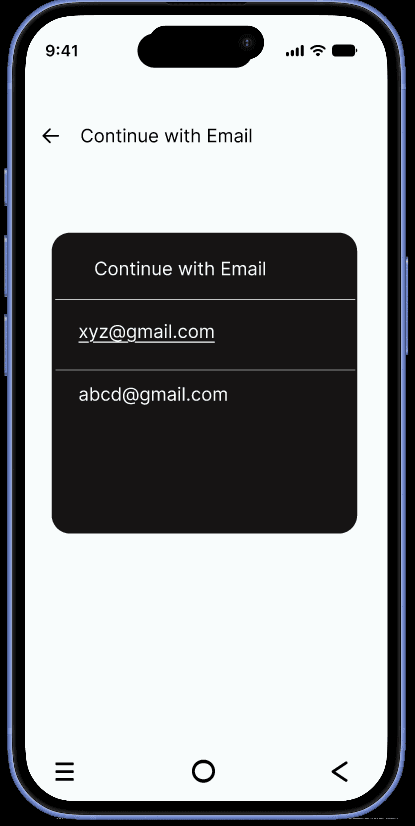
Mobile OTP, Email or Google sign-in parallel rather then forcing one method
Acknowledging that the caregivers and an elderly co-user may have very different comfort levels with each
AUTHENTICATION
Threre Paths, One Goal
UX walkthrough, stage by stage


PATIENTS DETAILS
Designed for Two languages
The Patient details form separates the account
The brand promise, how prescriptions get organized, and how efill/medication tracking works.
HOME PAGE
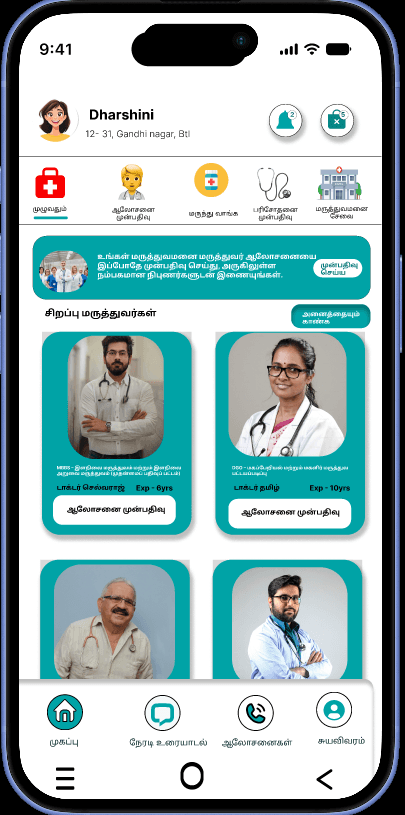
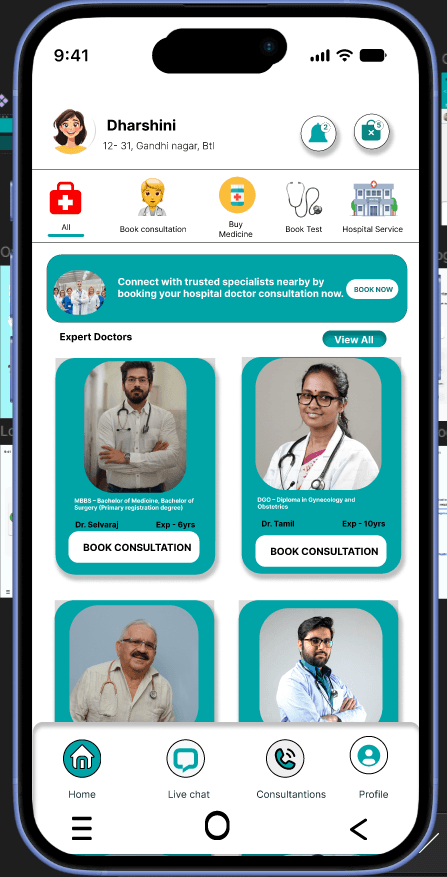
One Dashboard , Five core actions
The Home screen is organized around five icon-led shortcuts:
Book Consultations
Buy Medicine
Book Test
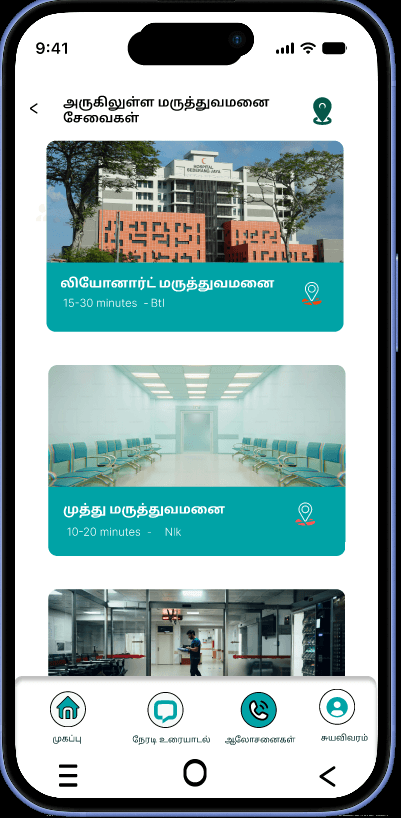
Hospital Service.


DOCTOR DISCOVERY
Live Consultation
The Patient details form separates the account
The brand promise, how prescriptions get organized, and how efill/medication tracking works.


MEDICAL ORDERING
From Prescription to Doorstep
The "Buy Medicine" flow lets user search or upload a prescription, browse nearby doctors, and check out,the medicine detail page includes plain-language dosage guidance
The Payment screen supports Cash on Delivery, Pay next month and multiple UPI/Wallet options


HEALTH PACKAGES
Care Before it becomes an Emergency
The home dashboard also promotes discounted health packages like Thyroid, X-ray & CBC etc test. Tapping a package shows it price and simple test preparation steps, so the patients know what to do beforehand.
From there, users move straight into the Make an appointment screen to book a slot, followed by payment to confirm it


APPOINTMENT BOOKING
From Booking to Everyday Care
The appointment form keeps things simple - Patient name, age, gender,date all on one clear screen so caregivers/patient can book quickly without confusion
CareLoop doesn't stop once the appointment is confirmed. A notifications screen keeps the caregiver/patient connected afterward

LANGUAGE SELECTION
Removing the Biggest Real-World Barrier
For many Elderly users in India, the language of the interface
not the number of taps is the actual barrier to using a healthcare app.
CareLoop offers English,Tamil,Hindi and Kannada as a first-class onboarding step, not a buried settings option
Design Learning
dharshini.g.2001@gmail.com
Key Takeaways
Designing for two very different users (elderly patients + their adult children) at once meant every screen had to work for both low digital literacy and high-stress, on-the-go usage.
Multi-language support (EN/TA/HI/KA) wasn't a "nice to have" — it directly affects whether an elderly patient can use the app independently at all.
What I'd Improve Next
Add a "family sharing" view so multiple children/relatives can co-manage one parent's care.
Explore voice input for the patient-facing side, since typing is a major barrier for elderly users.
Explore UI Case study here

CareLoop is a Mobile healthcare app designed to close the gap between elderly patients who need consistent medical attention and the adult children/family caregivers who manage that care remotely. The app lets a caregiver book doctor consultations, order prescribed medicines and injections, locate nearby hospitals and stay in live contact with doctors
CareLoop is a Mobile healthcare app designed to close the gap between elderly patients who need consistent medical attention and the adult children/family caregivers who manage that care remotely. The app lets a caregiver book doctor consultations, order prescribed medicines and injections, locate nearby hospitals and stay in live contact with doctors
CareLopp is a Mobile healthcare app designed to close the gap between elderly patients who need consistent medical attention and the adultchildren/family caregivers who manage that care remotely. The aoo lets a caregiver book doctor consultations, order prescribed medicines and injections, locate nearby hospitals and stay in live contact with doctors
Wireframes
Wireframes


Initial paper sketches were used to rapidly brainstorm and test basic layouts, user flows, and core feature placements before moving into digital design.
Initial paper sketches were used to rapidly brainstorm and test basic layouts, user flows, and core feature placements before moving into digital design.
Using Balsamiq allowed for quick transition from paper concepts into structured mid-fidelity wireframes, establishing clearer UI elements and navigational structures before moving to high-fidelity designs.
Using Balsamiq allowed for quick transition from paper concepts into structured mid-fidelity wireframes, establishing clearer UI elements and navigational structures before moving to high-fidelity designs.
CareLoop
UX Case Study
Smarter Care at Your Fignertips
Tools Used


When my mother got sick, I faced a few major problems trying to get her quick medical care.
I couldn't find clear options for doctors nearby. I tried calling local clinics, but no one responded properly.
The options I found had massive queues out front. Even for a minor health issue, we had to wait in long lines, which made me panic seeing my mom suffer.
Most local hospitals didn't show doctor availability or token status, making it impossible to plan ahead.
So, I decided to build an application for this, which helps elderly people and local families easily find nearby doctors and book appointments without standing in long queues.

Manikandan
Bio
Pain Points
Goals
30
BE(EEE)
Bangalore
BMS Engineer
Cannot visit his mother regularly due to work and living in a different city.
Worries about her daily health, meds, and sudden emergencies from afar.
Has no simple way to track her daily vitals or doctor visits in real time.
View real-time updates on his mother's daily health and medication routine.
Easily contact her doctors or book virtual appointments for her.
Get immediate notifications for missed medications or health emergencies.
Manikandan is a 30-year-old BMS Engineer based in Bangalore. Working demanding shifts while living far from home makes it hard to stay involved in his mother's daily routine and healthcare.
User Persona
User Persona
User Persona
This user persona represents working professionals living away from their families who need a reliable way to oversee their parents' healthcare remotely. It highlights the challenge of balancing a busy career while managing long-distance health anxieties and caregiving responsibilities.
Why Did I pick up this project
Why Did I pick up this project
When my mother got sick, I faced a few major problems trying to get her quick medical care.
I couldn't find clear options for doctors nearby. I tried calling local clinics, but no one responded properly.
The options I found had massive queues out front. Even for a minor health issue, we had to wait in long lines, which made me panic seeing my mom suffer.
Most local hospitals didn't show doctor availability or token status, making it impossible to plan ahead.
So, I decided to build an application for this, which helps elderly people and local families easily find nearby doctors and book appointments without standing in long queues.
This user persona represents working professionals living away from their families who need a reliable way to oversee their parents' healthcare remotely. It highlights the challenge of balancing a busy career while managing long-distance health anxieties and caregiving responsibilities.
Manikandan
Bio
Pain Points
Goals
30
BE(EEE)
Bangalore
BMS Engineer
Cannot visit his mother regularly due to work and living in a different city.
Worries about her daily health, meds, and sudden emergencies from afar.
Has no simple way to track her daily vitals or doctor visits in real time.
View real-time updates on his mother's daily health and medication routine.
Easily contact her doctors or book virtual appointments for her.
Get immediate notifications for missed medications or health emergencies.
Manikandan is a 30-year-old BMS Engineer based in Bangalore. Working demanding shifts while living far from home makes it hard to stay involved in his mother's daily routine and healthcare.
Manikandan is a 30-year-old BMS Engineer based in Bangalore. Working demanding shifts while living far from home makes it hard to stay involved in his mother's daily routine and healthcare.
BMS Engineer
Three Screens set expectations before account creation.
The brand promise, how prescriptions get organized, and how efill/medication tracking works.
ONBOARDING
Earning Trust before asking for anything
LANGUAGE SELECTION
Removing the Biggest Real-World Barrier
LANGUAGE SELECTION
Removing the Biggest Real-World Barrier
PATIENTS DETAILS
Designed for Two languages
The Patient details form separates the account
The brand promise, how prescriptions get organized, and how efill/medication tracking works.
PATIENTS DETAILS
Designed for Two languages
PATIENTS DETAILS
Designed for Two languages
PATIENTS DETAILS
Designed for Two languages
The Patient details form separates the account
The brand promise, how prescriptions get organized, and how efill/medication tracking works.
The Patient details form separates the account
The brand promise, how prescriptions get organized, and how efill/medication tracking works.
The Patient details form separates the account
The brand promise, how prescriptions get organized, and how efill/medication tracking works.
MEDICAL ORDERING
From Prescription to Doorstep
MEDICAL ORDERING
From Prescription to Doorstep
MEDICAL ORDERING
From Prescription to Doorstep
The "Buy Medicine" flow lets user search or upload a prescription, browse nearby doctors, and check out,the medicine detail page includes plain-language dosage guidance
The Payment screen supports Cash on Delivery, Pay next month and multiple UPI/Wallet options
The "Buy Medicine" flow lets user search or upload a prescription, browse nearby doctors, and check out,the medicine detail page includes plain-language dosage guidance
The Payment screen supports Cash on Delivery, Pay next month and multiple UPI/Wallet options
The "Buy Medicine" flow lets user search or upload a prescription, browse nearby doctors, and check out,the medicine detail page includes plain-language dosage guidance
The Payment screen supports Cash on Delivery, Pay next month and multiple UPI/Wallet options
HOME PAGE
One Dashboard , Five core actions
HEALTH PACKAGES
Care Before it becomes an Emergency
HEALTH PACKAGES
Care Before it becomes an Emergency
APPOINTMENT BOOKING
From Booking to Everyday Care
The appointment form keeps things simple - Patient name, age, gender,date all on one clear screen so caregivers/patient can book quickly without confusion
CareLoop doesn't stop once the appointment is confirmed. A notifications screen keeps the caregiver/patient connected afterward
The appointment form keeps things simple - Patient name, age, gender,date all on one clear screen so caregivers/patient can book quickly without confusion
CareLoop doesn't stop once the appointment is confirmed. A notifications screen keeps the caregiver/patient connected afterward
The appointment form keeps things simple - Patient name, age, gender,date all on one clear screen so caregivers/patient can book quickly without confusion
CareLoop doesn't stop once the appointment is confirmed. A notifications screen keeps the caregiver/patient connected afterward
Key Takeaways
Designing for two very different users (elderly patients + their adult children) at once meant every screen had to work for both low digital literacy and high-stress, on-the-go usage.
Multi-language support (EN/TA/HI/KA) wasn't a "nice to have" — it directly affects whether an elderly patient can use the app independently at all.
What I'd Improve Next
Add a "family sharing" view so multiple children/relatives can co-manage one parent's care.
Explore voice input for the patient-facing side, since typing is a major barrier for elderly users.
Start
Onboarding
(3 screen)
(Mobile OTP/Email/Google)
(EN/TA/HI/KA)
(Caregivers + Patient)
(Search & Upload)
Login
OTP Verification
Location Permission
Select Language
Patient Details Form
Home Dashboard
Buy Medicine
Medicine details
Dosage guidance
Cart
Payment Method
COD/UPI/Wallets
My Orders
(Reorder/Buy Again)
Notification
(Refill, Vitals, lab report
Profile Menu
(Consultation, appointment)
Help & Support
My Orders
(Reorder/Buy Again)
Success Confirmation
"Successfully Registered Your Appointment"
Book Test
Make an Appointment
Patient info + Symptoms
Hospital service
Nearby
Doctor Discovery
Nearby doctor List
Live chat / Call with doctor
Share Prescription Report, Photo
CareLoop
UX Case Study
Smarter Care at Your Fingertips
Tools Used
Tools Used
Why Did I pick up this project
CareLoop - End-to- End User flow
Start
Onboarding
(3 screen)
(Mobile OTP/Email/Google)
(EN/TA/HI/KA)
(Caregivers + Patient)
(Search & Upload)
Login
OTP Verification
Location Permission
Select Language
Patient Details Form
Home Dashboard
Buy Medicine
Medicine details
Dosage guidance
Cart
Payment Method
COD/UPI/Wallets
My Orders
(Reorder/Buy Again)
Notification
(Refill, Vitals, lab report
Profile Menu
(Consultation, appointment)
My Orders
(Reorder/Buy Again)
Success Confirmation
"Successfully Registered Your Appointment"
Book Test
Make an Appointment
Patient info + Symptoms
Hospital service
Nearby
Doctor Discovery
Nearby doctor List
Live chat / Call with doctor
Share Prescription Report, Photo
Help & Support
Share Prescription
Report, Photo
Live chat / Call
with doctor
UX Walkthrough, stage by stage
Mobile OTP, Email or Google sign-in parallel rather then forcing one method
Acknowledging that the caregivers and an elderly co-user may have very different comfort levels with each
AUTHENTICATION
Threre Paths, One Goal
Mobile OTP, Email or Google sign-in parallel rather then forcing one method
Acknowledging that the caregivers and an elderly co-user may have very different comfort levels with each
Mobile OTP, Email or Google sign-in parallel rather then forcing one method
Acknowledging that the caregivers and an elderly co-user may have very different comfort levels with each
For many Elderly users in India, the language of the interface
not the number of taps is the actual barrier to using a healthcare app.
CareLoop offers English,Tamil,Hindi and Kannada as a first-class onboarding step, not a buried settings option
The home dashboard also promotes discounted health packages like Thyroid, X-ray & CBC etc test. Tapping a package shows it price and simple test preparation steps, so the patients know what to do beforehand.
From there, users move straight into the Make an appointment screen to book a slot, followed by payment to confirm it

CareLoop
UI Case Study
Smarter Care at Your Fingertips
COLOR SYSTEM
ICONOGRAPHY
ILLUSTRATION
TYPOGRAPHY
INTER
Sans-Serif
Primary Color
Font
Family
Secondary Color
Aqua Teal
(#00A3A6)
(#A4F7F8)
(#0D9488)
(#FFFFFF)
Teals like #00A3A6 evoke feelings of calm, cleanliness, and modern reliability, making them widely used in healthcare, technology, and government design systems.
High brightness combined with soft cyan hues enhances visual acuity while reducing eye strain and mental fatigue in digital environments.
Creates a sense of openness, spatial clarity, and transparency, helping to eliminate feelings of confinement in medical environments.
In clinical terms, #0D9488 (Deep Teal Green) induces a state of physical stability and mental calm by modulating the autonomic nervous system and cognitive load.
Bright Aqua
Teal Green
Medical White
Clear, unconfusing typography provides an immediate sensation of transparency, order, and control, helping lower anxiety during health data review.
Thoughtfully designed medical illustrations are used in the onboarding screens to create a warm, approachable first impression while guiding users through the app’s core capabilities.
Menu Icons
Bottom Section
Other Icons



Design Learning
Design Learning
In clinical terms, #0D9488 (Deep Teal Green) induces a state of physical stability and mental calm by modulating the autonomic nervous system and cognitive load.
In clinical terms, #0D9488 (Deep Teal Green) induces a state of physical stability and mental calm by modulating the autonomic nervous system and cognitive load.
🧑⚕️
🩺
🧑⚕️
🩺
Category Bar
Bottom Section
Color Balance: Teal signals clinical trust without feeling cold, paired with Bright Aqua tints to soften the healthcare feel.
Inclusive Typography: Inter maintains high legibility for both caregivers and elderly parents without requiring bloated font sizes.
UI Key Takeaways
What I Would Improve Next

"Click through the real experience — onboarding to booking confirmation, exactly as a caregiver would use it."
THANK YOU FOR YOUR TIME
G.Nagadharshini
UI/UX Designer
When my mother got sick, I faced a few major problems trying to get her quick medical care.
I couldn't find clear options for doctors nearby. I tried calling local clinics, but no one responded properly.
The options I found had massive queues out front. Even for a minor health issue, we had to wait in long lines, which made me panic seeing my mom suffer.
Most local hospitals didn't show doctor availability or token status, making it impossible to plan ahead.
So, I decided to build an application for this, which helps elderly people and local families easily find nearby doctors and book appointments without standing in long queues.
Problem
Elderly Patients often struggle with
Managing multiple prescription, refill dates, and dosages schedules
Travelling to hospitals for routine consultancy or minor health issues
Communicating clearly with doctors, especially around medication instructions.
Meanwhile, Their adult children - often the actual decision-makers and caregivers are,
Living separately or juggling work while trying to monitor a parents health
Without a single, reliable channel to coordinate care, order medicine, or reach a doctor quickly
Left out of the loop on prescription, appointment and emergencies
Goals
Let caregivers book consultations and order medicine/ injections directly from a prescription, in a few taps.
Enable direct, low-friction contact with nearby doctors — via chat, call
Build a system that keeps caregivers informed and in control
Design an interface that feels trustworthy, calm and simple — appropriate for a healthcare context and usable across age groups
Manikandan
Bio
Pain Points
Goals
30
BE(EEE)
Bangalore
BMS Engineer
Cannot visit his mother regularly due to work and living in a different city.
Worries about her daily health, meds, and sudden emergencies from afar.
Has no simple way to track her daily vitals or doctor visits in real time.
View real-time updates on his mother's daily health and medication routine.
Easily contact her doctors or book virtual appointments for her.
Get immediate notifications for missed medications or health emergencies.
Manikandan is a 30-year-old BMS Engineer based in Bangalore. Working demanding shifts while living far from home makes it hard to stay involved in his mother's daily routine and healthcare.
UX Walkthrough, stage by stage
PATIENTS DETAILS
Designed for Two languages
The "Buy Medicine" flow lets user search or upload a prescription, browse nearby doctors, and check out,the medicine detail page includes plain-language dosage guidance
The Payment screen supports Cash on Delivery, Pay next month and multiple UPI/Wallet options
MEDICAL ORDERING
From Prescription to Doorstep
The Patient details form separates the account
The brand promise, how prescriptions get organized, and how efill/medication tracking works.
Design Learning
HEALTH PACKAGES
Care Before it becomes an Emergency
The home dashboard also promotes discounted health packages like Thyroid, X-ray & CBC etc test. Tapping a package shows it price and simple test preparation steps, so the patients know what to do beforehand.
From there, users move straight into the Make an appointment screen to book a slot, followed by payment to confirm it
The appointment form keeps things simple - Patient name, age, gender,date all on one clear screen so caregivers/patient can book quickly without confusion
CareLoop doesn't stop once the appointment is confirmed. A notifications screen keeps the caregiver/patient connected afterward
APPOINTMENT BOOKING
From Booking to Everyday Care
Explore the interactive flow
This user persona represents working professionals living away from their families who need a reliable way to oversee their parents' healthcare remotely. It highlights the challenge of balancing a busy career while managing long-distance health anxieties and caregiving responsibilities.
Design Learning
CareLoop - End-to- End User flow
CareLoop - End-to- End User flow
Start
Onboarding
(3 screen)
(Mobile OTP/Email/Google)
(EN/TA/HI/KA)
(Caregivers + Patient)
(Search & Upload)
Login
OTP Verification
Location Permission
Select Language
Patient Details Form
Home Dashboard
Buy Medicine
Medicine details
Dosage guidance
Cart
Payment Method
COD/UPI/Wallets
My Orders
(Reorder/Buy Again)
Notification
(Refill, Vitals,
lab report
Profile Menu
(Consultation,
appointment)
My Orders
(Reorder/Buy Again)
Success Confirmation
"Successfully Registered Your Appointment"
Book Test
Make an Appointment
Patient info + Symptoms
Hospital service
Nearby
Doctor Discovery
Nearby doctor List
Help & Support
Share Prescription
Report, Photo
Live chat / Call
with doctor
Wireframes
Initial paper sketches were used to rapidly brainstorm and test basic layouts, user flows, and core feature placements before moving into digital design.
Using Balsamiq allowed for quick transition from paper concepts into structured mid-fidelity wireframes, establishing clearer UI elements and navigational structures before moving to high-fidelity designs.
Three Screens set expectations before account creation.
The brand promise, how prescriptions get organized, and how efill/medication tracking works.
ONBOARDING
Earning Trust before asking for anything
AUTHENTICATION
Threre Paths, One Goal
Mobile OTP, Email or Google sign-in parallel rather then forcing one method
Acknowledging that the caregivers and an elderly co-user may have very different comfort levels with each
LANGUAGE SELECTION
Removing the Biggest Real-World Barrier
For many Elderly users in India, the language of the interface
not the number of taps is the actual barrier to using a healthcare app.
CareLoop offers English,Tamil,Hindi and Kannada as a first-class onboarding step, not a buried settings option
HOME PAGE
One Dashboard , Five core actions
The Home screen is organized around five icon-led shortcuts:
Book Consultations
Buy Medicine
Book Test
Hospital Service.
The Patient details form separates the account
The brand promise, how prescriptions get organized, and how efill/medication tracking works.
DOCTOR DISCOVERY
Live Consultation
Design Learning
Key Takeaways
Designing for two very different users (elderly patients + their adult children) at once meant every screen had to work for both low digital literacy and high-stress, on-the-go usage.
Multi-language support (EN/TA/HI/KA) wasn't a "nice to have" — it directly affects whether an elderly patient can use the app independently at all.
What I'd Improve Next
Add a "family sharing" view so multiple children/relatives can co-manage one parent's care.
Explore voice input for the patient-facing side, since typing is a major barrier for elderly users.
Explore UI Case study here